Stream Lurker
Auto-lurk Twitch & Kick streams from your desktop.
A standalone desktop app that checks your favourite streamers and quietly lurks the ones that are live — with 7tv support built in.
Features
- ▸Auto-lurks every streamer on your watch list the moment they go live
- ▸Works with both Twitch and Kick
- ▸Built-in 7tv extension support — no manual setup
- ▸Lightweight desktop app (Electron) — no browser windows cluttering your taskbar
- ▸One-click start / stop for your whole lurk list
- ▸Ability to add Chrome extensions
What is Stream Lurker?
Stream Lurker is a tiny desktop companion for people who want to support their favourite streamers without burning a browser tab per channel. Add the streamers you care about, hit start, and Stream Lurker keeps a quiet lurk session open for every one that's live — invisible until you need it.
How it works
- Install the latest version from the button above.
- Add streamers by username (Twitch or Kick).
- Hit start. Stream Lurker polls each one, opens a lurk session when they're live, and closes it when they're not.
That's it. No accounts to link, no overlays to configure.
You can link your accounts to earn points, drops, and chat!
Why use it?
- You watch a lot of streamers and Chrome can't keep up.
- You want clean view-count support without dedicating a tab to each.
- You prefer one tidy desktop app over twelve floating browser windows.
Got a feature request or a bug to report? Open an issue on the GitHub repo
Screenshots
Changelog
- v0.10.0-alpha2026-06-18
Lurk Stats & Leaderboard
- Expandable Lurk Stats modal — full ranking, totals, averages, top platform, and fun facts
- Click any streamer for a per-streamer breakdown (rank, share, longest session, last lurked)
- GitHub-style daily activity heatmap with current/longest streak counters
- Tracks lurk sessions, per-session durations, and daily watch-time
Multi-Lurk Grid
- Single-stream pop-out / Picture-in-Picture into an always-on-top window — auto-suspends the in-grid copy (Ghost Mode) while popped out to avoid double-decoding
- "Live right now" top-bar pill + popover to open any live streamer in one click
Fixes
- Opening a stream no longer force-switches the active view to the Multi-Lurk grid
- Lurk Stats modal scrollbar no longer clips the rounded corners
- v0.9.1-alpha2026-06-16
Stream Lurker v0.9.1-alpha
⚡ 1-Click Login (new)
Logging into Twitch, YouTube, and Kick no longer requires copy-pasting cookies by hand. This release adds the Stream Lurker Connector browser extension:
- Install the extension (bundled with the app — see the 1-Click Login panel under Platform Logins → Open Extension Folder, then load it unpacked in Chrome/Edge).
- Enter the one-time pairing code shown in the app.
- Click Connect Twitch / YouTube / Kick — your already-logged-in browser session is imported instantly.
How it works: the app runs a localhost-only receiver (127.0.0.1) guarded by the pairing code; the extension reads your platform cookies (including the httpOnly ones a page script can't see) and hands them to the app. Manual cookie paste still works as a fallback.
Install: download
Stream-Lurker-Setup-0.9.1-alpha.exebelow. Existing installs will auto-update. - v0.9.0-alpha2026-06-16
Stream Lurker v0.9.0-alpha
A login overhaul — all three platforms can sign in again.
Logins
- Kick — fixed the "browser not supported" error. The embedded browser now presents a clean, current Chrome identity with consistent client-hints (it was reporting an outdated Electron/Chrome build and leaking the Electron brand).
- Twitch — embedded login is blocked by Twitch's bot protection (Kasada), so it's now browser-assisted: sign in with your normal browser and paste your session once to connect. The full session is imported so it stays logged in.
- YouTube — Google blocks embedded sign-in, so it's now browser-assisted via cookie import: export your youtube.com cookies with a free cookie-export extension (e.g. Cookie-Editor) and paste them in.
- Fixed the anti-detection ("stealth") script that was silently failing to run, so the embedded browser no longer looks automated.
Other
- Removed the Twitch Drops & Inventory dashboard.
Install: download
Stream-Lurker-Setup-0.9.0-alpha.exebelow. Existing installs will auto-update. - v0.8.2-alpha2026-06-07
Stream Lurker v0.8.2-alpha
🔑 Logins fixed
- Twitch / YouTube / Kick sign-in works again. A user-agent change introduced in 0.8.0 created a fingerprint mismatch that tripped Google/Twitch's "browser may not be secure" block. Login windows now use a consistent fingerprint, restoring sign-in across all platforms.
- Kick login detection reworked so the login window reliably detects when you've signed in and closes on its own.
🧩 Extensions
- New "Recommended Extensions" catalog in the Adblock & Extensions tab — one-click install of uBlock Origin and 7TV straight from GitHub.
- 7TV is now optional (no longer bundled/auto-installed) and auto-patched for Kick emote support on install.
- After installing an extension, restart the app to finish loading it.
💬 Chat
- New "Open chat in browser" button on every stream — opens that channel's chat in your default browser, where you're already signed in, so you can chat while you lurk.
🧹 Other
- Rumble is now marked Coming Soon and disabled by default.
- Removed the unreliable Kick live-follows scan (blocked by Kick's bot protection).
- Activity console log lines are now selectable/copyable.
- Renamed the "Clips & Points" sidebar tab to "Clips."
📦 Upgrade
Auto-update from 0.8.1-alpha via Settings → App Updates → Check for Updates.
Full Changelog: https://github.com/Kyogrim/stream-lurker/compare/v0.8.1-alpha...v0.8.2-alpha
- v0.8.1-alpha2026-06-07
Stream Lurker v0.8.1-alpha
✨ New
- Auto-updater — A new App Updates card under System Settings lets you check for new releases, download them, and restart-to-install with one click. From this version onward, future updates won't require a manual reinstall.
🐛 Fixes
- Preempted streams now reopen — When a lower-priority stream is closed to make room for a higher-priority one, it will now correctly auto-open again once the higher-priority stream ends and a tab slot frees up. Previously, 24/7 streams would stay closed for the rest of the session.
📦 Upgrade notes
- This is the first auto-updateable release. Older builds (0.8.0-alpha and earlier) do not have the updater wired in, so you'll need to run the new installer once manually. After that, future versions update themselves.
Full Changelog: https://github.com/Kyogrim/stream-lurker/compare/v0.8.0-alpha...v0.8.1-alpha
- v0.8.0-alpha2026-06-04
Stream Lurker v0.8.0-alpha
This release marks a massive upgrade to Stream Lurker, introducing interactive clips management, smart resource options, schedule scraping, and major UI layout improvements!
🎬 1. Replaced Drops with Twitch Clips Manager
- Clips Tab Grid: A new sidebar navigation tab opens a responsive masonry layout showing the most popular and trending clips from your monitored streamers.
- Custom Feed Filters: Filter feeds dynamically by Latest, Trending, or Popular.
- Native Clip Viewer: The "Watch" button now opens clips inside a clean, native, ad-free Electron window instead of redirecting to your default system browser.
- Secured Clip Downloads: Twitch's signed playback tokens are queried dynamically via GQL to guarantee full-speed
.mp4downloads instead of failing or outputting corrupted files. - Saved Library: Save your favorite clips to a persistent local library.
- Auto-Points Claimer: The Twitch Channel Points Auto-Claimer has been relocated to the System Settings tab to keep the Clips view clean.
🍃 2. "Ghost Mode" CPU/GPU Optimizer (Suspension Layer)
- Decoder Suspension: Click the green "Ghost Icon" on any active stream cell (or use Ghost All in the toolbar) to suspend video rendering.
- Compositor & Video Hiding: Sets the host
<webview>tovisibility: hidden(instructing Chromium to skip compositing the guest page layout) and injects a script to hide the guest<video>element (suspending the video decoding pipeline). - Earn Rewards in the Background: Toggling Ghost Mode keeps background JavaScript running at full speed. Your account remains active as a viewer, allowing you to claim Twitch drops and collect channel points with a significantly lighter rendering footprint.
📅 3. Dynamic Rolling Calendar & Auto-Sync
- Chronological Rolling Layout: The calendar automatically adjusts columns based on
new Date().getDay(). The leftmost column is always labeled Today, followed by Tomorrow, and the subsequent 5 days in rolling order. - Visual Highlight Accents: "Today" features a glowing electric-green border, and "Tomorrow" is accented with a dashed violet layout.
- Twitch Weekly Calendar Scraper: Auto-queries Twitch's internal GQL schedule queries on startup to auto-populate stream segments.
- YouTube Waiting Room Protection: Scans YouTube's
/liveendpoint forupcomingEventDatato correctly detect scheduled streams, adding them to the calendar instead of false-positive loading empty offline players.
🎛️ 4. Dynamic Layout Switcher & DOM Rearrangement
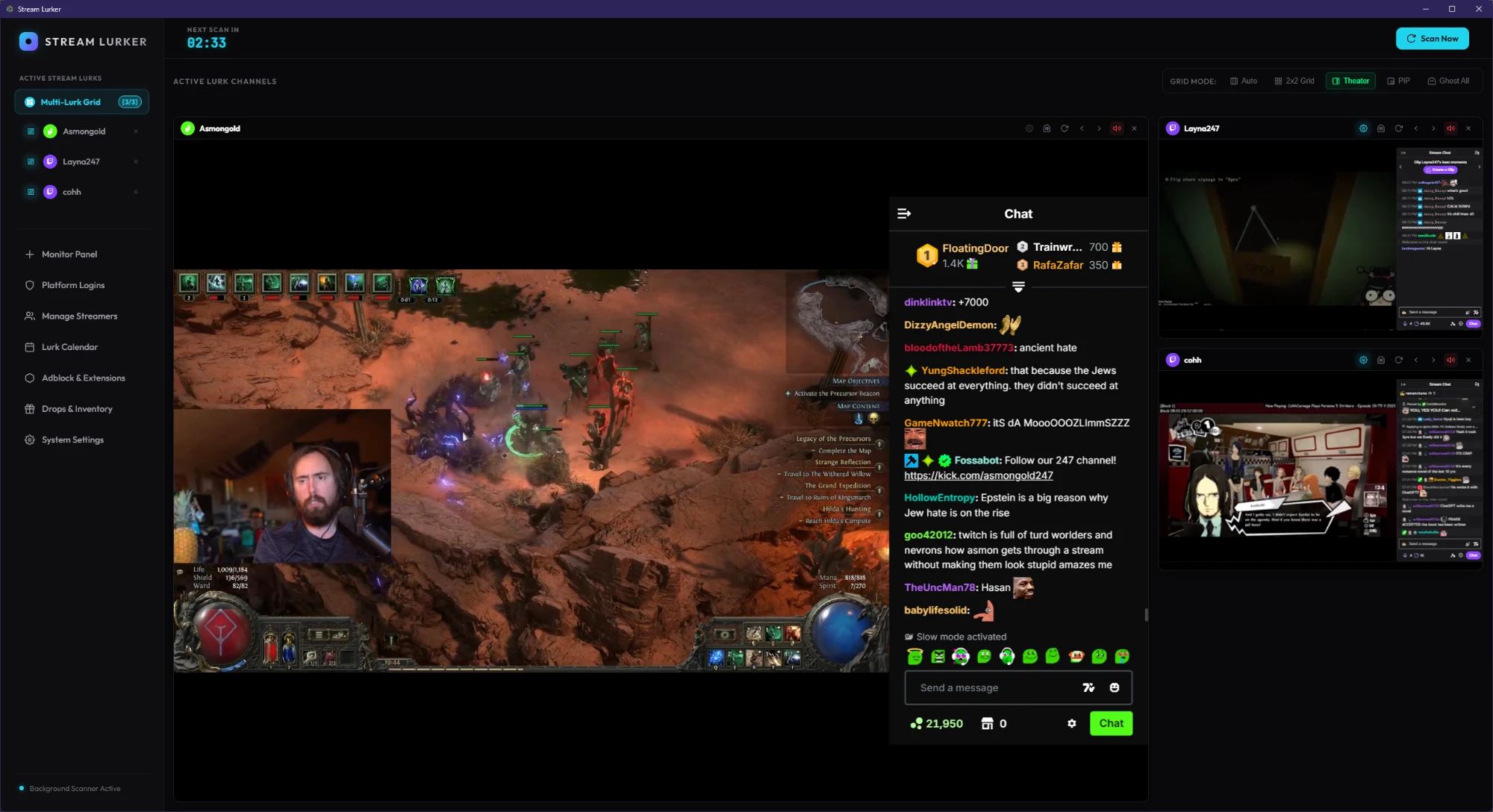
- Layout Switcher Toolbar: Cycle between Auto, 2x2 Grid, Theater Focus (1 large stream + 3 small vertical streams), and Picture-in-Picture (PiP) layouts.
- Cell Shifting Controls: Arrow buttons in cell headers let you swap stream positions directly in the DOM on the fly, instantly changing which stream is featured in Focus/PiP layouts with zero page reloads or feed interruptions.
- Individual Stream Reload: Refresh individual frozen or crashed streams with a dedicated reload button per card.
⚖️ 5. Drag-and-Drop Priority & Auto-Preemption
- Drag-and-Drop Priority: Reorder streamers dynamically in the Manage Streamers tab using native HTML5 drag-and-drop.
- Priority-Based Preemption: When connection limits are reached, the application evaluates streamer priorities. If a higher-priority stream goes online, the app automatically closes the lowest-priority active stream to make room for it.
🛡️ 6. Kick.com Auto-Quality Self-Healer & 7TV Updater
- Bottom Sheet Adaptation: Enhanced the quality selector click handlers to correctly query responsive bottom drawers used by Kick on small screen sizes.
- Self-Healing Resolution Loop: Periodically reads
video.videoHeight. If the player resets to high quality, it triggers a self-healing selection cycle to force the resolution back to your preferred quality (e.g., 160p). - 7TV Nightly Auto-Updater: Scans GitHub on startup for new nightly versions of the 7TV extension, downloads and extracts them, and automatically patches permissions for Kick.com emotes.
🛠️ Bug Fixes & Stability
- Fixed an Electron startup crash (
TypeError: Session can only be received when app is ready) by delaying thewill-downloadsession handler registration. - Cleared all missing IPC handler errors (
sync-platform-schedulesanddownload-clip).
- v0.5.0-alpha2026-06-02
initial release.
More from Kyogames
A web-based builder for crafting custom streaming overlays — identity, particles, audio reactivity, paranormal effects and more. Export and drop straight into OBS.
Run your tabletop sessions in the browser with advanced dynamic lighting, real-time fog of war, and a vibrant community library.